
What the program can do
KIplatz is an AI for Windows 11 in its own window: your conversations on the left, the answer on the right. Here every function is described in 1 or 2 sentences, with the way to the matching guide.
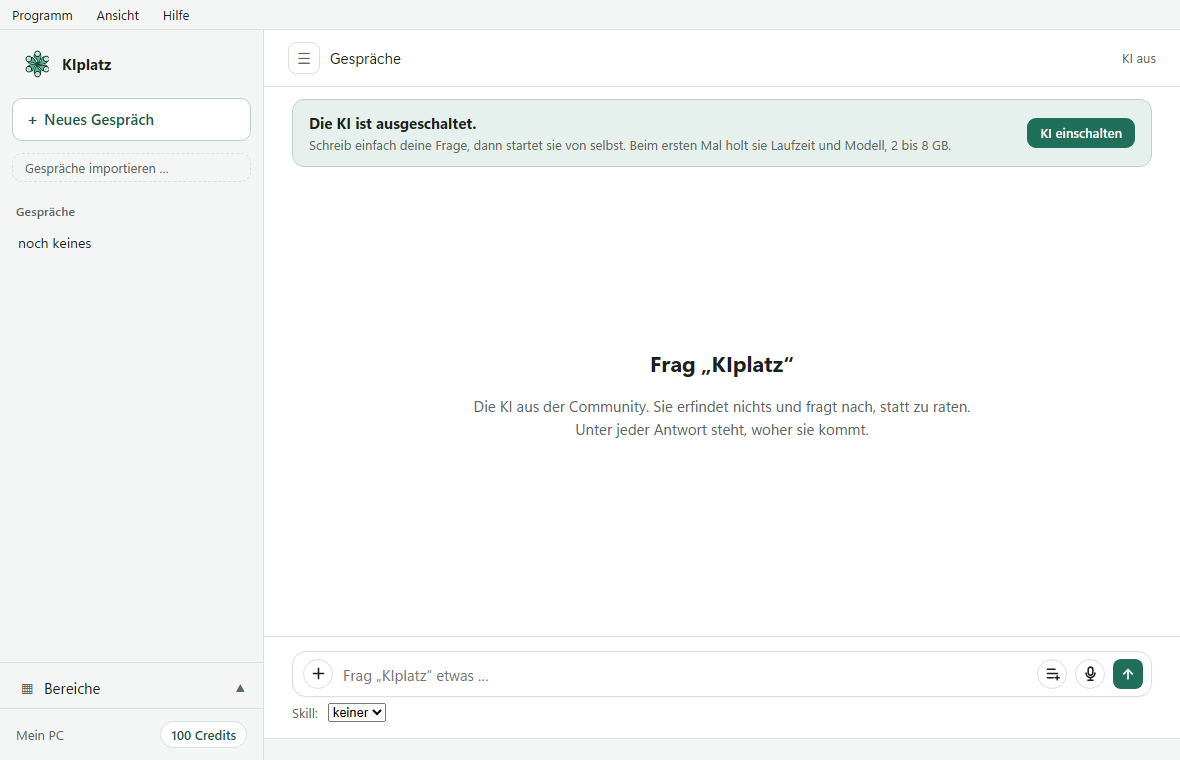
From the input field to the morning briefing
You write into the input field at the bottom and send with Enter; Shift + Enter starts a new line. If an answer gets too long, the small square “Antwort stoppen” (stop answer) halts it.
- Files and images: The “+” in the input field attaches a file, an image, a folder or a picture of your screen. Everything is read on your PC.
- Speaking and reading aloud: press the microphone, speak, press it again, and the text is in the input field. The speaker under an answer reads it aloud.
- Ask about selected text: select text anywhere, press Ctrl + Space, and it is ready in quotation marks.
- Memory: write “Merk dir: …” (remember: …), and the AI knows it from then on. The list stays on your PC.
- Create skills: short instructions that the AI follows in a conversation. 10 templates are ready.
- Morning briefing: every day at the time you choose, the weather for your place and 5 headlines, read aloud if you like.
- Ask on your phone: an app that you open in the browser at kiplatz.at/app and put on your home screen.
- Your files from anywhere: On the go, you ask on your phone, for example “Wo ist meine Bewerbung?” (where is my job application?), and your PC at home searches your folders. What you tick comes to your phone encrypted, with no cloud in between. The function is called “Frag dein Zuhause” (ask your home).
- Correct an answer: thumb down and write what is right. Your PC follows it at once.
- Asking well: say it as you would to a person. If something important is missing, the AI asks.
Organising conversations
A right-click on a conversation in the bar offers “Umbenennen” (rename), “Anheften” (pin), “In ein Projekt verschieben …” (move to a project), “Archivieren” (archive), “Als Textdatei speichern” (save as text file) and “Löschen” (delete). Deleted items move to the recycle bin in your data folder. With “Gespräche importieren …” (import conversations) you bring in histories from other AI programs or from a text file.
The pages of the left bar
| Page | What you find there |
|---|---|
| “Rechenkraft teilen” (share computing) | Start, pause and stop, plus when and how much your PC may work for others (Set limits) |
| “Wissen” (knowledge) | the sources KIplatz knows: websites, your own folders, local knowledge, with search |
| “Meine Community” (my community) | today’s balance, who is taking part, your share of the shared storage, “Frag dein Zuhause” with the QR code for your phone, your account, mistake of the week, leaving |
| “Bestenliste” (leaderboard) | all PCs that have worked for others, and your credits |
| “Prüfen” (check) | answers that other members want confirmed; 2 credits per check |
| “Skills” | your own instructions and the templates |
| “Einstellungen” (settings) | appearance, autostart, AI on and off, memory, morning briefing, shortcuts, home network, removing |
| “Was verlässt meinen Rechner” (what leaves my computer) | every connection since the start, where to and what for, without contents |
The menus at the top
| Menu | Entries |
|---|---|
| “Programm” (program) | the areas from “Gespräche” (conversations) to “Einstellungen”, “Beim Anmelden automatisch starten: ein/aus” (start automatically at sign-in: on/off), “Fenster ausblenden (läuft unten weiter)” (hide window, keeps running at the bottom), “KIplatz beenden” (quit KIplatz) |
| “Ansicht” (view) | “Dunkles Fenster: ein/aus” (dark window: on/off), “Seitenleiste ein/aus (Strg+B)” (sidebar on/off, Ctrl+B) |
| “Hilfe” (help) | “Platzordnung” (house rules), “Nach Update suchen” (check for updates), “Fehler melden” (report a bug), “Über KIplatz” (about KIplatz) |
Good to know
The X at the top right only hides the window; it keeps working next to the clock. To quit completely, use “Programm” and “KIplatz beenden”.
KIplatz fetches updates by itself, checks their signature and then shows “Neu in dieser Version” (new in this version). “Fehler melden” sends us a report, without your questions.