
Memory
KIplatz remembers only what you expressly tell it. You can see everything that is stored at any time and delete it with one click.
Remembering with one sentence
Just write one of these sentences into the input field, like any question:
| You write | What happens |
|---|---|
| “Merk dir: ich wohne in Gmunden” (remember: I live in Gmunden) | KIplatz knows it from now on |
| “Merke dir, dass ich Vegetarier bin” (remember that I am vegetarian) | the same, the wording is free |
| “Vergiss das mit Gmunden” (forget the Gmunden thing) | that entry is gone |
| “Vergiss alles” (forget everything) | all entries are gone |
| “Was weißt du über mich?” (what do you know about me?) | you get the whole list |
The window answers these sentences itself. Nothing leaves your PC for this.
View and delete under Settings
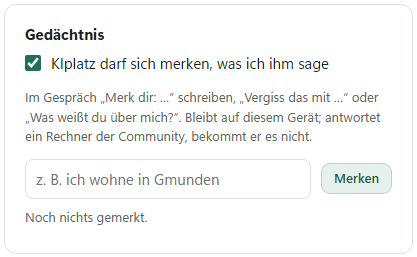
- Click “Einstellungen” (settings) on the left and scroll to the section “Gedächtnis” (memory).
- All entries are listed there, each with a date.
- The small cross next to an entry deletes exactly that one.
- “Alles vergessen” (forget everything) empties the whole list, after a confirmation.
You can also enter something yourself in the field above and click “Merken” (remember). The switch “KIplatz darf sich merken, was ich ihm sage” (KIplatz may remember what I tell it) turns remembering off completely.
Only your own sentences
Nothing is guessed or read along. Entries come from your sentences and from 2 of the questions at the first start: what KIplatz should call you and where you live. What you need KIplatz for and how it should answer is not kept here but under My AI. The morning briefing also uses your place of residence.
There is room for 60 entries of up to 300 characters each. If a new one is added when the list is full, the oldest drops out.
Good to know
The list is stored as a file in the data folder of your PC. If another PC in the community answers your question, it never receives it. More under Privacy.